This has been going through the interwebs for a few days, getting quite a lot of press. Here it is for those vanishing few who read this blog, but not the news or other interweb homepages.
Based on a true story:










This has been going through the interwebs for a few days, getting quite a lot of press. Here it is for those vanishing few who read this blog, but not the news or other interweb homepages.
Based on a true story:
Here is yet another list of flash games I’ve come across that I’ve enjoyed. One common thread is that they all have graphics reminiscent of atari or merely pixilated quality.
Story Teller – by Daniel Benmergui. Not so much a game (but the first 4 aren’t really games exactly) but an essay in this genre, which I don’t know how to describe. Basically arrange the universe at each stage to see the various outcomes.
I Wish I were the Moon – again by Daniel Benmergui. The same sort of thing, but more options, and weirdly heartfelt. For blocky characters.
Today I Die – again by Daniel Benmergui. And again the same method of interaction, only 2 endings this time. This one seems more angsty to me, but still nice.
Majesty of Colors – Similar to the ones above but by a different guy. Many endings and more game-like, but thematically similar.
Don’t Look Back – A definite game, apparently based on the Greek story of Orpheus. Except instead of a musical instrument, you have a gun. Altogether a nice flash game showing the futility of love, the inevitability of death, and the non-necessity of amazing graphics to tell a story.
Games are fun.
So my old XP computer is doing a major fade. Over the weekend I had Norton File Protection encounter a problem and crash, well hurrah. The main drive was down to 3 gigs, and the computer seemed sluggish, so I moved or deleted stuff that freed up 36 gigs, but Norton was being a pain in the ass and holding on to all of it for it’s undelete. I really hated the protected recycle bin, but it saved me once so I was always hesitant to turn it off. I tried to empty the protected files, and it just froze up explorer. So then I tried turning it off from the Norton config screen, and trying to get there froze up norton, ah crap. I tried to manually restart the service, but it didn’t seem to like that either, so I resolved to reboot. As it shut down and then again while it was loading, I thought it was taking a very long time. And then when it was up again, it still felt sluggish, even after waiting for the inevitable startup crap to finish up. Process explorer showed that the Interrupts pseudo-task was doing little spikes here and there, 1% here, and then maybe a minute later, jump up to 20% for a second, then back down to nothing again for a while. I immediately felt uneasy… something was up, I knew it didn’t normally do that. But I left it for a bit thinking maybe I missed it before.
During the week, it occurred to me why windows might be slow and why interrupts would be running. Something I had read about a few years ago somehow bubbled to the top, PIO transfer mode. See, device data transfer is too annoying for a CPU to usually get involved, it’s too slow, so it gets tossed off to dedicated handlers to do it behind the CPU’s back, and it’s called DMA. There are increasing levels for DMA, higher is better, and faster. Normally these are set to take the best mode available for the device and the cabling. Now, the thing I had read about was how Windows could be mean to you if you had a scratched CD or a flaky hard drive. As the operating system encounters errors from the device for those reasons (especially bad for a simple scratched CD or DVD), it steps down through the access methods until it hits the lowest level, PIO, where the CPU does the heavy lifting. Now, that’s nice and all, especially with a flaky device, keeps it alive. But windows keeps (or perhaps kept, not sure if this changed) the value forever. So one bad CD and ruin your drive essentially, by dumming it down to PIO. It can be changed, but not really easily, you can’t just tell it to be good again, you need to jump through a couple hoops.
Unfortunately, my hard drive was set to this PIO mode, so it was slow as a river of bricks. Now, I started looking up how to reset it to its former glory, but checking the event log showed me why it was dropped to PIO at all.
Warning:An error was detected on device \Device\Harddisk0\D during a paging operation.

Error:The device, \Device\Ide\IdePort0, did not respond within the timeout period.
What? What the hell now… are you kidding? Oh dear god no…. more digital fire. And searching for these terms is no help, I found tonnes of people all asking each other if they knew what it meant, and usually the symptoms were accompanied by freezing or occasional failure to boot. Yeah, it looked bad, and the options here were no good at all. The drive could be failing… the drive controller could be failing… the motherboard could be failing. About the only non-disastrous cause was perhaps the IDE cable was screwed up. But given the age of the drive, I think it really could be dying outright. Even the secondary hard disk in the computer was getting reports of errors and a status of Healthy (At Risk) from the Disc Management snap-in, so both were heading downhill. I did entertain myself a bit trying to see if maybe it was that drive that was set to PIO and was causing all the fuss, but according to XP, Device 0 on IDE chain 0 was set to PIO, while all the others were set to high DMA levels. And even at PIO, more errors were being added to the log. There was never a problem that windows directly reported, so I guess the drive eventually responded. But I was waiting for it to just bluescreen on me at any minute, so I spent hours into the night copying, very very slowly, everything I could think of from the two internal drives to my external drives. Trouble is that stuff is everywhere, and I had to hunt around a bit.
Now I think I’ve copied everything I can, so I’ve shut down the dear old XP box. I’ll only start it again if I remember something I needed to salvage, or when I start to tinker with it. I’ll try to figure out what’s wrong with it, I mean, there seem to be several things, since when it did the hard fails with bluescreens before, I was checking the event logs a lot and hadn’t seen the hard drive related errors then, so this appears to be relatively new.
The other other thing that’s done this is one of the external drives I have, where occasionally it just dies, windows claims it can’t see anything on it, 0 bytes, but the drive is there. Also can’t safely remove it despite nothing having an open handle to it, but cycling the hard drive power makes it come back, and apparently, with no ill effect. I think I’ll need to replace that one too, but I put low priority stuff on it anyway. I was nearly going to buy a NAS recently too, with dual 1-TB drives for it, on Raid-1, but I can’t justify the expense to myself right now, proping up the economy be damned. I looked up Drobo first actually, it sounded like a neat device at the time, but it is hella expensive, no discs with it, and only recently got Network-connectivity at huge expense, so I don’t think I can go for that one either.
When my parents computer exploded when I touched it, and when we surmised (though it has not yet been confirmed) that it was due to a hard drive failure, I thought to myself, I haven’t really had a hard drive fail. Well, I had one that occasionally threw out CRC warnings, but it lasted a good long time and I replaced it with another one for capacity reasons. But I hadn’t had a big one. I thought I was due, but not this soon. I suppose I’m lucky in that I had the chance to back stuff up.
Anyone got some DAT’s they don’t need anymore… and a backup server to write to them?
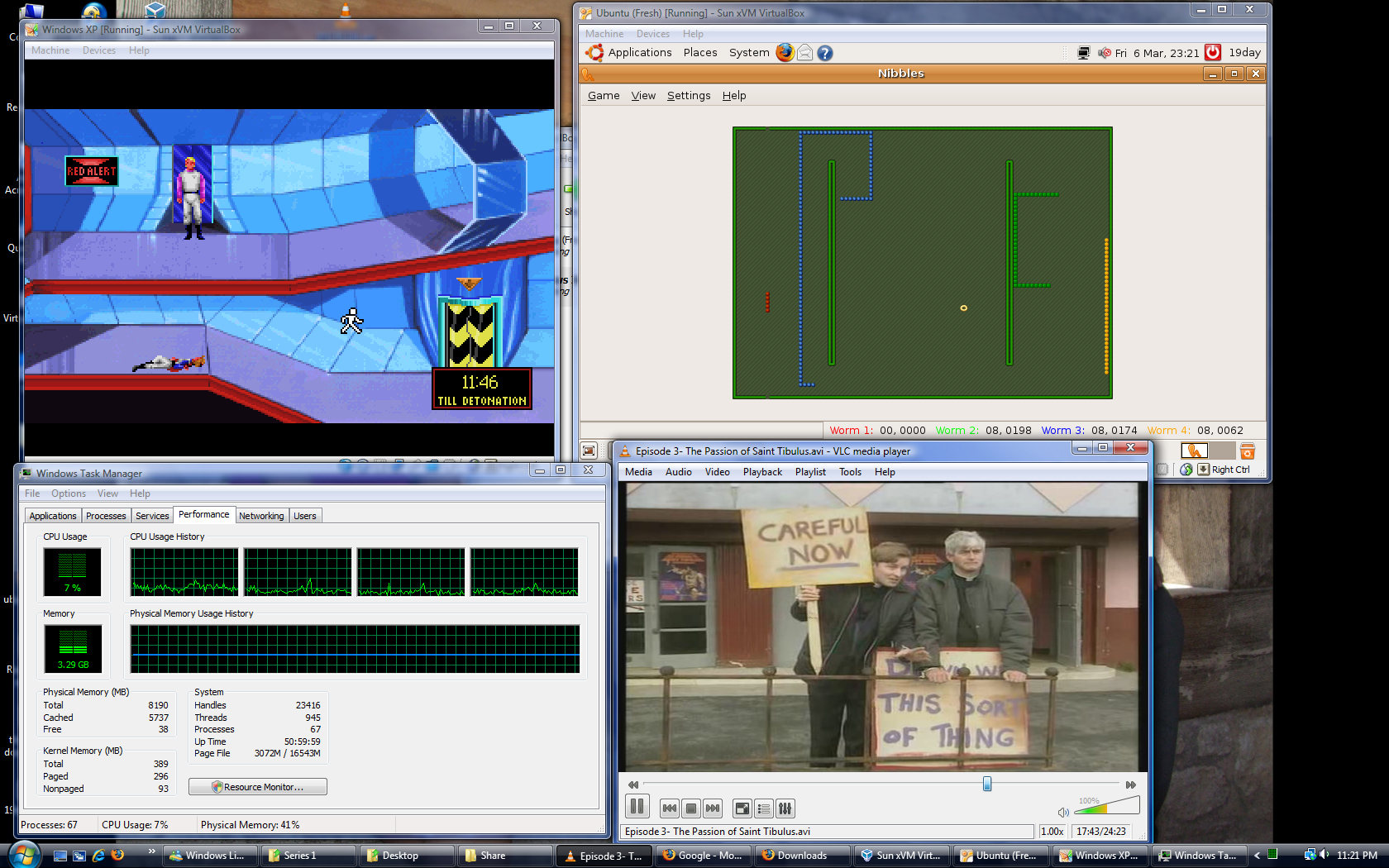
So I found my copy of XP and installed a virtual machine of it on my vista box. Running XP in a virtual machine does have it’s disadvantages, at least using VirtualBox. For fun I decided to try to run the Hitchhiker’s Guide to the Galaxy text adventure on it first, sort of like how I tried running it first on Vista to find (or rather, sadly, confirm) that DOS stuff was right out on 64bit platform. Unfortunately, under the XP VM, the whole thing died taking the VM manager with it, which is pretty crappy. A bug was logged with Sun a year ago and I guess it’s not a priority, as everything still seems to run under DosBox.
Can I just say thank bob for DosBox? If it weren’t for that, my parents new computer wouldn’t be usable as a backup for my mother if her work computer dies. Dosbox provides a valuable service that Microsoft seems unwilling to provide. Which is unfortunate, fine, but also kind of weird. I mean, who better than they to provide this, even if not baked into windows but as a side-along app like Dosbox? And I’ll quote something from The Old New Thing
Why 16-bit DOS and Windows are still with us
Many people are calling for the abandonment of 16-bit DOS and 16-bit Windows compatibility subsystems. And trust me, when it comes time to pull the plug, I’ll be fighting to be the one to throw the lever. (How’s that for a mixed metaphore.)
But that time is not yet here.
You see, folks over in the Setup and Deployment group have gone and visited companies around the world, learned how they use Windows in their businesses, and one thing keeps showing up, as it relates to these compatibility subsystems: Companies still rely on them. Heavily.
Every Company has its own collection of line-of-business (LOB) applications. These are programs that the company uses for its day-to-day business, programs the company simply cannot live without. …
The LOB application is the deal-breaker. If a Windows upgrade breaks a LOB application, it’s game over. No upgrade. No company is going to lose a program that is critical to their business.
And it happens that a lot of these LOB applications are 16-bit programs. Some are DOS. Some are 16-bit programs written in some ancient version of Visual Basic.
…
Perhaps with a big enough carrot, these companies could be convinced to undertake the effort (abd risk!) of porting (or in the case of lost source code and/or expertise, rewriting from scratch) their LOB applications.
But it’ll have to be a really big carrot.
Real example: Just this past weekend I was visiting a friend who lived in a very nice, professionally managed apartment complex. We had occasional to go to the office, and I caught a glimpse of their computer screen. The operating system was Windows XP. And the program they were running to do their apartment management? It was running in a DOS box.Chen, R (2007). The Old New Thing:Practical development throughout the evolution of windows. Boston,MA: Pearson Education, Inc.
For simple consumers not interested in building their own computers (like my parents), seems that the carrot is actually more of a stick. See, if you just walk into a big box store like Futureshop trying to get a simple desktop computer, all you can get now is 64bit machine with 64bit vista. Dell is pretty much like this too (though the last I checked, you could still try to get 32bit Vista, but I don’t think it’s DOS support is all there, if at all). So really I guess it’s businesses that get to hang onto their stuff for a while longer, since businesses are the big important thing. My mother is her own business, and it needed WordPerfect 5.1. Oh well, apparently. So again, thankfully Dosbox picks up the pieces for us. At least so far, I’m still holding my breath until such time as she actually tries to use it fully to see if it all works.
But anyway, at least with this XP VM I can remote desktop to work, which pretty much covers all I needed, so I guess I can ditch this old crashy XP machine, except that it has all my stuff… grr. Oh, and I decided to install my Space Quest collection Alicia got me on the XP VM, set up the sound card, and try to play it. It actually works, and the sound as well (though that took a few tries). I’m amused that it installs it’s own copy of Dosbox though, hehe.
So for the second time, a computer under my influence has died. I did a couple of things to it before the big fade, I moved some music files from the boot partition to another partition to free up space. I ran Ccleaner to delete the IE mystery zone of internet files and cookies and such, but I didn’t have it touch the registry or anything sensitive. I downloaded overdisk to see what was using the most space, and I saw that a lot of it was in windows, in the spot where it downloads updates. It had downloaded 45 updates, but it wasn’t set to install them. I know of a number of worms around exploiting patched defects, so I had it install them. Oh, you need to reboot now? Okay. Ah yes, dual boot, 98 or XP, well, back into XP….
Windows could not start because the following file is missing or corrupt.

D:\WINDOWS\SYSTEM32\NTOSKRNL.EXE

Please reinstall a copy of the above file.
Ah crap. That’s not good. I rebooted and tried again (why not) and it happened again. I rebooted again and went into the primary boot partition that is running windows 98 (which is what originally came from the computer). I use explorer on 98 side to see that the file for the XP side is indeed there, but as for it being corrupted, I couldn’t tell that. Doing this took like half an hour, because accessing certain bits of the D: filesystem froze up 98 pretty good for around 10 minutes each. This was the first real clue as to what might be going on. The second was attempting to reboot into XP again in Safe Mode, and then Last Good Configuration Mode, and getting absolutely nothing… just a black screen and no disk activity whatsoever. The third clue, if it is one, was some odd behaviour when booting back into 98.
See, after rebooting back and forth a couple of times, 98 wouldn’t boot up normally anymore. I was infuriated at that point. It was doing it’s crap behind the 98 loading logo, and then beepidy beeped, and brought me back to text mode with Norton saying that it thinks it smells disk corruption and to press any key to scan, and then goes ahead and scans anyway. It immediately started with the D drive, which is where XP lives, rather than C drive, which is 98 side. It made it as far as scanning for a boot sector and basically froze up. I reset and then canceled the scan to make it all the way into 98, which is more or less stable for the moment.
I had also attempted to boot from XP Pro install disc we’ve got here and try to repair the installation. I had tried once and got into the Recovery Console, but it couldn’t read the D drive (after the fact, I suspect it remapped stuff around). I tried again but selected to install XP (I was looking for the magic auto fixer). I got as far as XP asking which partition I wanted to install on. It saw the C drive and its one partition, with 98 on it. It saw the D drive (physically) and it saw 3 partitions, as it should. Unfortunately, only the last one was given it’s volume label, the other two were labeled as Unknown Partition. This could only be very bad.
All research into the problem I was doing online was being done on my mother’s work computer, a seperate but equally fragile 98 install. The 98 side of the affected computer didn’t have net setup properly (we basically always used XP on that one). Certain malware can do stuff like what we saw, but given the 98 side freezeups trying to enumerate the file system, my brother and I decided it must be corruption on the disk itself. A disk that unfortunately was sliced into 3 partitions.
What to do was also a problem, no partition was big enough to act as a new XP host, we weren’t sure if the XP disc we had was valid (or if it was from my installation on my home computer, it tended to get passed around so XP could be repaired. I really hate the policy these days of not giving installation media but having “Recovery Partitions”… you can’t actually fix anything, you just destroy your data is all), and the computer itself is old, could we even buy a new internal IDE drive to install XP on?
So we decided, perhaps impulsively, to just go out and get a new computer, so we got an HP Pavillion, Quad Core, 4 GB RAM, Vista Home Premium computer 64bit. Apparently you can’t get a 32bit computer anymore, at least not from a big box store. I really wanted it to be 32bit (or running a 32bit OS) because I wanted fewer headaches for my parents to use the stuff they wanted to use. Anyway, stuck with 64bit machine, I’ve been attempting to set it up. Despite my parents not doing much with the ‘fun’ computer (as opposed to my mother’s ‘work’ computer), there are a couple of things that they wanted. Primarily, it needed to be a backup for the fragile work computer, meaning it has to run WordPerfect 5.1, which she has to use. The DOS one. The one from 1989. Vista 64bit has totally dropped support for DOS stuff… luckily Dosbox is there to pick up the peices and I got that working with WP so far. Getting a copy of WP off her machine was another trick entirely. Both the vista and work machines are tied into a router, but they couldn’t effectively see each other, a few internet searches warned about attempting this freezing 98, so I backed off and did some tricks with the internet to get the files to me.
Two other lost causes are the scanner and printer, both use parallel port for connection, and apparently that form of connectivity has been shunned. So getting this computer means new scanner and printer I guess. The 98 side of the broken computer can still use them I think, but I don’t want to attempt hooking crap up to the work machine for fear of breaking that too. Another potential loss is my father’s horse pedigree related program, he said he can just download it again as he bought a license to use it and all, but I was worried about it being compatible with vista. It is trapped on the broken computer right now so I can’t try it right now, but I’m currently lead to believe that it is 32bit, as is its installer, which is good news.
Trying to rescue stuff off the broken machine has proved to be a bit of a problem. I bought a spool of CD’s in the hopes of just using 98 side to burn whatever we wanted, however 98 can’t see the burner, maybe it never could, it worked fine in XP and that’s all we used, damnation. Internet doesn’t work either, despite all the settings basically being correct compared to the other 98 machine that connects fine, so I’m out of ideas there. The grand plan was to get an IDE enclosure to put the defective drive in, rescue as much as possible, and see if it really was corruption. However, brother didn’t bring his, and we couldn’t find one to buy here, so I guess that part of the plan has to wait for another day.
So really, I’m not sure if I caused the problem by installing the updates, hell, maybe we played with the windows XP boot logo, I can’t remember, I don’t think we did though. I know that will cause kerplosion when you install a service pack. Or maybe Ccleaner killed something, but I doubt it. I hope it’s the corruption thing, cause then it will just have been a coincidence. A horrifying, expensive coincidence. My parents and brother don’t understand why I get so worked up about computer problems, when I get into a level of anxiety usually reserved for spiders crawling on my face and me with my arachnophobia.
The trick is, I’m a packrat, in a physical sense to a degree, but much much more in a digital sense. My home computer’s 2 internal drives and 4 external drives (with an addition external I used for backup, and another one sitting at work) are a bit of an indicator. Now, take someone who is really a packrat in the traditional sense, and then set their house on fire… see how they react. These types of computer screwups are, to me, a digital fire.
So my XP computer has been having issues, it was bluescreening and rebooting spontaneously in ways that made me feel like its days were numbered. So in somewhat of an impulsive move, I bought a computer off my brother. I had been toying with the idea of getting a new computer for a while, but I had held off due to wanting to avoid Vista. But the recent crisis tipped my hand and I took the plunge.
So what do I have, it is an HP m9450f, Intel Core2 Quad 2.50GHz, 8 GB RAM, Nvidia Geforce 9800 GT, and running, regrettably, Vista, and not just any Vista, but Vista x64. Well, with that amount of RAM, you probably knew that. More specifically, it’s Vista Home Premium, which has most but not quite all the features most people would want, and of course, Vista Business has them, but takes other stuff away, forcing people to go to Ultimate, sneaky.
Unfortunately, I’ve been hit by the double whammy of Vista and being 64bit, in that, basically nothing works. I’m sure if I was running 32 bit Vista I’d have some problems, but not others, but the 64bit causes all sorts of new fun. 16 bit stuff won’t work at all anymore. Well, I got Dosbox and was able to run The Hitchhiker’s Guide to the Galaxy text game (as sort of a christening of dosbox) well enough, and who gives a crap about 16 bit windows programs, right? Well, it seems that a few things used 16 bit programs as part of their installers. So I wanted to install the ancient version of 3d studio I have to see it render fast and bring tears to my eyes, to find that the installer wouldn’t run because it was incompatible, which still brought tears to my eyes none-the-less. I can’t VPN into work either, not with the currently supplied Cisco software. Someone said they got something that worked with vista and gave me the link, I tried to run it, and it wouldn’t work. 64 bit be damned.
So I thought, Vista is a pain, but I bet I can use VirtualBox to install a copy of XP, so I install the software and hunt around for my XP disc, and can’t find it. Looking up the system information on my computer, it seems I had an OEM version after all, so I wouldn’t be able to install it anyway, at least not in Microsoft approved ways. Since I had VirtualBox installed anyway, I decided to install Ubuntu instead.
I’ll have to keep the XP box around for a while I guess, it has for the moment ceased it’s spasms so I guess I have more time with it. I bought a wireless router to hook both boxes up to the internet and, more importantly, so they could see each other so as to trade files. When I opened the router box, there was a tape across the wired ports imploring me to run the included CD first. I couldn’t imagine what kind of software would be on this CD, but I tried it anyway. And it provided detailed, step by step instructions on how to install the router. I decided to do all this on the Vista box so I could still use the old machine to look up help in case things failed.
It managed to fail very quickly. The autorun on the CD failed when start.exe couldn’t be run, but not to fear, Vista has applied compatibility settings to the file and I should try again. I quickly look at the router box again… Vista Certified… indeed. I run it, this time it launches the step by step guide to installing the router.
First, plug the ethernet cord that was in the computer into the uplink (or ‘yellow’) port. Done
Now, plug one end of the included ethernet cord into the port marked 1 and the other end into the computer. Done
Now, plug the power adapter into the router. Done
Now, plug the power adapter plug into an outlet. Shit, I did that at step 3, hopefully that’s okay.
Detecting network.. detecting router,… detecting internet. Can’t find internet *slap*. Yeah, I followed your steps, but you can’t find my internet? It offers to either end the installation without having internet, or to try looking for it again. Trying to Look Again just has it immediately tell me it still can’t find it, so I tell it to just finish up, figuring I’ll still have better luck than it will. I go and configure the router to shut down the wireless component, since I didn’t want to deal with that bit yet (Wii).
After going into Vista’s network manager screen, I delete some erroneous networks it created, and it goes and figures out the rest on its own and bam, internet. I plug in my XP computer to the second port, ipconfig release and renew, bam, both have new IP’s on the private network, and both can see the internet. Pity they can’t see each other. Vista can ping the other machine, but the funky graphical network map can’t see it. XP is even worse, it can’t see the Vista machine via the IP at all, not even to ping it.
So I install some hotfix on XP that makes Vista capable of seeing it, and that appears to be enough for it to see the shares I had left on the thing from my university days. I had to spend some time on the internet to figure out how to get Vista to let XP see stuff. I’ve also discovered that on Vista, selecting the Sharing option on a folder and using the basic “Share this folder” just doesn’t seem to work, I have to go into Advanced Sharing and get whammed by a UAC window in order to really share it. But at least at the end, it worked. That and I had to go into the pre-installed Norton Internet Security thingy and tell it to let the other computer in. I love the pre-installed junk that comes with computers. And bonus, since it belonged to my brother for a duration before I got it, it arrived telling me that my protection was expired. yay.
Anyway, I’ve only had this thing for a couple of days, but I think I’m going to end up still using the old one for a while yet, both the switch to Vista, and 64bit, just limits me a bit too much. I’m hoping Windows 7 will live up to the hype, and I may install it on this box when it comes out.
I installed Doom 3 though, High quality mode, pretty snappy.
P.S. This was written and posted from the Vista machine, IE crashed consistently when looking at the history, but that’s fine, I just needed IE long enough to get to the Firefox download site.
I went for a little trip down memory lane, looking up the intro themes for some shows I used to watch as a kid, it’s chilling to see them again after so long, some of them only at the edge of my memory
Stop remembering TV and get back to work
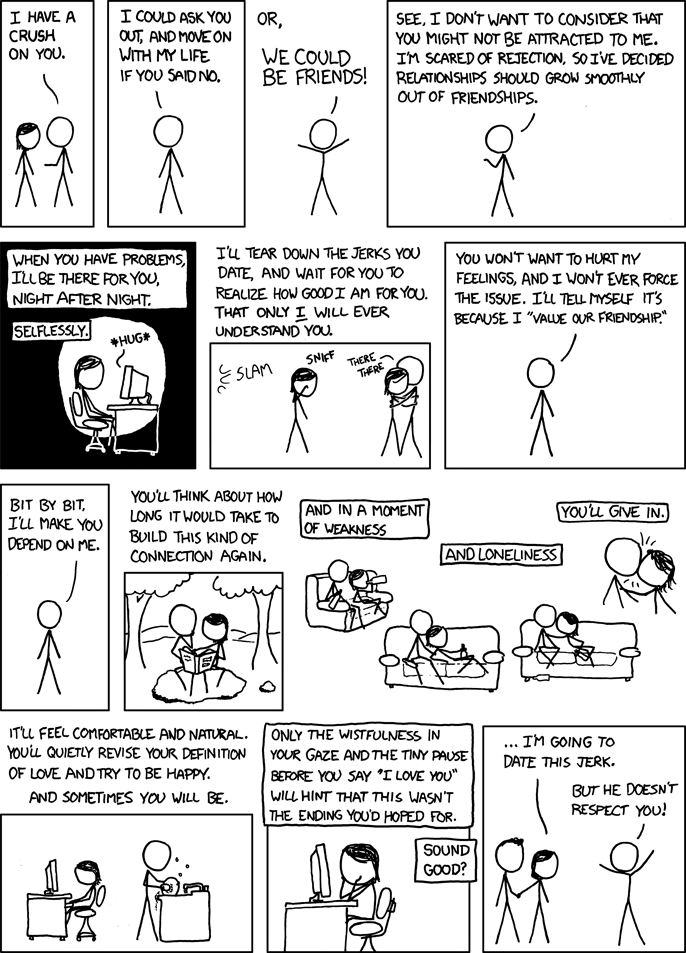
XKCD hit the nail on the head with this comic, the dawning realization of familiarity is both surprising and incredibly depressing.
For some reason I was looking at some old renderings I had done. Some are okay, some are shite, but I’ve posted images before and thought, why not upload some of them to youtube and show them. And so I did, and so here they are.
I have a few other video’s tucked away, but they can wait for another day
Powered by WordPress
Page by 19day (S.B.H.)
Everything here is property of 19day productions, unless it isn't, and cannot be claimed by anyone else regardless, sort of like a copyright, but in many more words.
Last modified: September 07 2009 18:21:00.


